
To check and download your PESCO Online Bill, you can use this site. You do not need to rely on third-party sites; the authentic portal allows you to view, print, or download your duplicate electricity bill immediately by using your 14-digit reference number or 10-digit consumer ID.
- Website: Go to the PESCO Online Bill website. Type your reference number without spaces and click Check Bill. You can print or save the bill as a PDF.
- Mobile Apps: Open Easypaisa, JazzCash, or your banking app. Go to Bill Payments > Electricity > PESCO, and enter your number to see the total and pay instantly.
- Informational Blogs: Sites like
pescoonlinebill.net.pklet you enter your reference number for any electricity provider in Pakistan. - This includes:
- Major Companies: LESCO (Lahore), IESCO (Islamabad), FESCO (Faisalabad), GEPCO (Gujranwala), and PESCO (Peshawar).
- Regional Companies: MEPCO (Multan), HESCO (Hyderabad), SEPCO (Sukkur), QEPCO (Quetta), and TESCO (Tribal areas).
- Private Utility: K-Electric (Karachi).
Distribution Companies (DISCOs)
Punjab Province
- LESCO: Lahore Electric Supply Company
- GEPCO: Gujranwala Electric Power Company
- FESCO: Faisalabad Electric Supply Company
- IESCO: Islamabad Electric Supply Company
- MEPCO: Multan Electric Power Company
Khyber Pakhtunkhwa (KPK)
- PESCO: Peshawar Electric Supply Company
- TESCO: Tribal Areas Electric Supply Company
Sindh Province
- HESCO: Hyderabad Electric Supply Company
- SEPCO: Sukkur Electric Power Company
Balochistan Province
- QESCO: Quetta Electric Supply Company serves the entire Balochistan province.
Private Utility (Karachi)
- KE: K-Electric serves Karachi and its surrounding areas (formerly known as KESC)
Alternatively, look at the red box highlighted in the image below to find your 10-digit Customer ID.
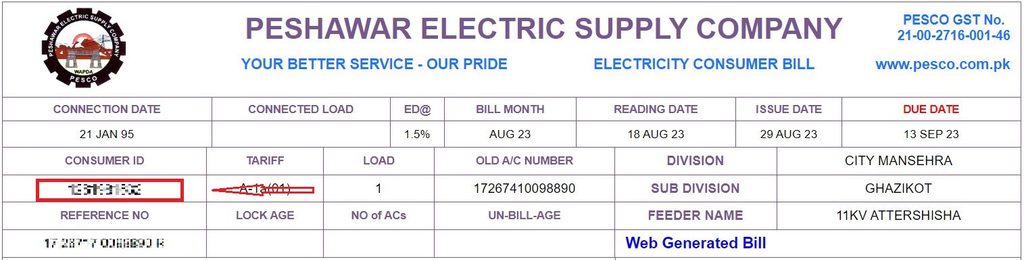
At pescoonlinebill.net.pk, you can quickly check your total bill amount, due date, and other critical details.
Your online bill also displays:
- Key Dates: Meter reading and bill issue timelines.
- Charges: Current amounts due and late payment surcharges.
- Tracking: A clean chart of your payment history over the last 12 months.
PESCO Online Bill Check by Name
You cannot check your PESCO bill by name because multiple consumers often share the same name.
To find your exact bill details instantly, you must use one of these two options:
- Reference Number: Enter your unique 14-digit number (found on the top-left of any old bill).
- Consumer ID: Enter your 10-digit identification number.
Simply type either number into the search field to access your current statement.
PESCO Online Bill Check 14-digit
You can easily check your PESCO bill online using your 14-digit reference number. This unique number is assigned to each PESCO consumer and helps identify your electricity connection accurately. Simply enter your 14-digit reference number to access and view your PESCO online bill details.
PESCO Bill Updates: Available by the 13th of Each Month
Worried about not receiving your electricity bill (bijli ka bill) on time? Don’t worry. You can generate a duplicate PESCO bill online and avoid missing your payment deadline or paying late charges. Simply enter your 14-digit reference number to view your current PESCO bill or check bills from previous months.
PESCO Peak Hours and Energy Conservation
Lower your electricity use during PESCO peak hours to cut your monthly bill and prevent power grid overloads.
Electricity rates spike dramatically during these four-hour peak blocks for users with a Time-of-Use (ToU) meter.
The official seasonal timings are:
- Summer (June to Aug): 7:00 PM to 11:00 PM
- Winter (Dec to Feb): 5:00 PM to 9:00 PM
- Spring & Autumn (Mar to May / Sept to Nov): 6:00 PM to 10:00 PM
Using high-power appliances outside these peak periods can help reduce pressure on the electricity network and promote efficient energy consumption.
How to Check Your PESCO Bill Online
Checking your PESCO online bill is quick and straightforward. Follow these simple steps:
- Visit pescoonlinebill.net.pk
- Enter your 14-digit reference number.
- View your latest bill amount and payment due date.
- Select “View Full Bill” to see complete billing details or download a copy for your records.
Get a duplicate copy of your PESCO bill instantly by entering your reference number at pescoonlinebill.net.pk.
New Connection or Bill Name Change Procedure
To apply for a new PESCO connection or transfer an existing one to your name, you must submit a formal application at your nearest PESCO office.
Updating the name on an electricity bill after buying a new property requires the same process as applying for a new connection.
What You Need to Do:
- Visit the Office: Go to your local PESCO subdivision office.
- Submit Documents: Bring your property ownership papers (registry), a copy of your CNIC, and the previous owner’s paid electricity bill.
- Pay the Fee: Clear any outstanding dues and pay the required connection transfer fee.
Visit your nearest PESCO office to submit an application for a name change or correction and learn about the required documents.
Taxes and Charges on Your PESCO Bill
Understanding the different taxes and charges listed on your electricity bill can help you better understand your total payable amount. Below are some common charges you may find on a PESCO bill:
1. FPA (Fuel Price Adjustment)
Fuel Price Adjustment (FPA) represents changes in electricity generation costs resulting from fluctuations in fuel prices. This adjustment may vary from month to month depending on changes in fuel costs and other applicable factors.
2. TR Surcharge (Tariff Rationalization Surcharge)
The TR Surcharge is applied to account for differences between the tariffs determined by NEPRA and those notified by the Government of Pakistan (GOP).
3. FC Surcharge (Financing Cost)
The Financing Cost (FC) Surcharge is a charge of Rs. 0.43 per kWh that helps cover debt-servicing costs associated with Power Holding Private Limited.
4. Deferred Amount
A Deferred Amount is an optional payment that allows you to postpone paying part or all of your bill without incurring late-payment charges for that amount. The deferred balance may appear on your future bills either as installments or as a single amount.
5. QTR Tariff Adj / DMC
QTR Tariff Adjustment (QTR Tariff Adj) refers to periodic changes in electricity tariffs. These quarterly adjustments are generally reflected on electricity bills every three months, depending on the applicable tariff and billing period.

Have More Questions? Contact Us!
If you have any questions or need further assistance, feel free to contact us. For helpful contact details and support information, visit our PESCO Helpline page.
PESCO Web Bill: Frequently Asked Questions
Q. How do I download my PESCO e-bill?
- A. Go to
pescoonlinebill.net.pkand enter your reference number to open your bill summary. Click “View Full Bill” to print or save the document as a PDF for free.
Q. What is the official PESCO complaint number?
- A. For breakdowns, wrong billing, or urgent issues, call the main PESCO headquarters helpline directly at 111-000-118.
Q. Can I estimate my PESCO bill amount online?
- A. Yes. Type your current monthly units consumed into our free online bill calculator tool to get an instant cost estimate.
Q. How can I search my bill without a reference number?
- A. You cannot. Web portals require a valid 14-digit reference number or a 10-digit Consumer ID. You cannot pull data using your CNIC, name, phone, or home address.
Q. What does FPA mean on my electricity bill?
- A. Fuel Price Adjustment (FPA) is a monthly charge that shifts based on global fuel cost changes used to generate electricity.
Q. Can I check old, historical PESCO statements online?
- A. Online portals generally display only the current active month. To fetch older records or payment receipts, visit your local PESCO subdivision office.
Q. What is a PESCO detection bill?
A. This is a fine or corrective bill issued if inspectors discover power irregularities, meter tampering, or direct wire hooking (electricity theft) on a connection.